# Ubuntu + Windows 双系统安装后要做的事
-
Update Apt Image
System → about → system update
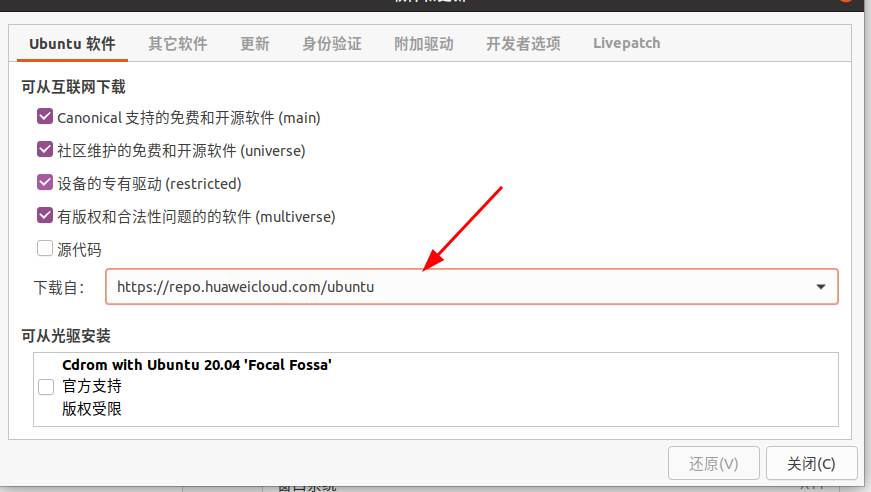
测速,选择最快的镜像(虽然速度有点慢!)
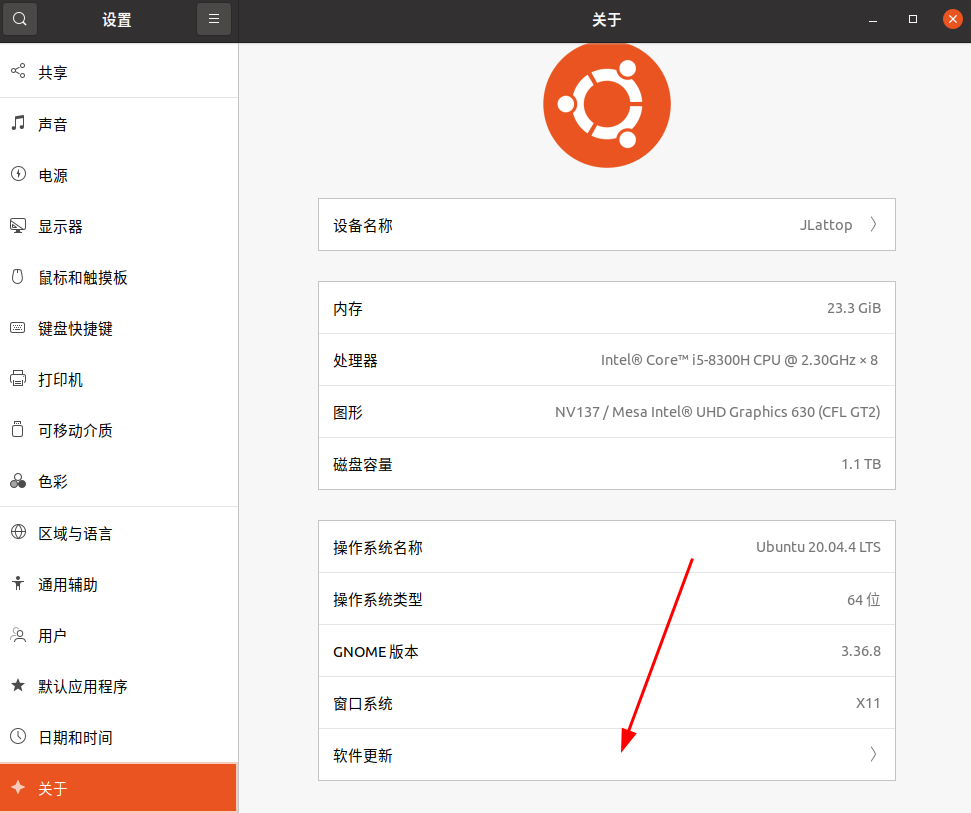
-
Unable to lock directory /var/lib/apt/lists/
That’s is have something running . You must waiting for something end.
-
双系统 Ubuntu + Windows 时间不正确
把ubuntu时间更新到计算机硬件时间上,在ubuntu的终端上输入如下代码:
# 更新ubuntu的系统时间 sudo apt-get update sudo apt-get install ntpdate sudo ntpdate time.windows.com # 将时间更新到硬件上 sudo hwclock --localtime --systohc -
install input method “Chinese”😛
# add apt repository sudo add-apt-repository ppa:hosxy/fcitx5 #just install chinese input method sudo apt install fcitx fcitx-pinyin fcitx-libpinyin reboot -
Install V2ray on Ubuntu. 😀
#step1 download V2Ray Or to Select a version you want https://github.com/Qv2ray/Qv2ray/releases/tag/v1.99.6
wget https://github.com/Qv2ray/Qv2ray/releases/download/v1.99.6/Qv2ray-refs.tags.v1.99.6-linux.AppImage

#step2 change the file to executable
sudo chmod +x ./Qv2ray-refs.tags.v1.99.6-linux.AppImage

#step4 Download File "V2ray-core"
wget https://github.com/v2ray/v2ray-core/releases/download/v4.22.1/v2ray-linux-64.zip

#or to slect one https://github.com/v2ray/v2ray-core/releases/

#step3 run app
./Qv2ray-refs.tags.v1.99.6-linux.AppImage

# config the core file
# ok
https://github.com/Qv2ray/Qv2ray/releases/download/v1.99.6/Qv2ray-refs.tags.v1.99.6-linux.AppImage
-
美化Ubuntu
Browse Latest | https://www.opendesktop.org/s/Gnome/browse/
Browse Latest | https://www.gnome-look.org/browse/
参考至: https://www.jianshu.com/p/8079ce5057d3?msclkid=5bb5860ba92911ec96ccbc39e60f770
# 删除Ubuntu 自带Dock sudo apt remove gnome-shell-extension-ubuntu-dock # 隐藏Topbar , 根据 https://github.com/pixel-saver/pixel-saver -
安装微信,Edge
- 下载包 .deb
下载 Microsoft Edge Web 浏览器 | Microsoft
- 打开终端 😻
# 安装 过程可能会有依赖缺少,按照提示下载即可 sudo dpkg -i xxxxxxx.deb -
安装Tim
搭建
-
配置磁盘自动挂载
https://blog.csdn.net/O0o_Or_not/article/details/110125064
# 获取要自动挂载的分区的UUID和分区类型TYPE sudo blkid # 取消挂载 后尝试手动挂载到 指定文件夹 sudo mount -t ntfs /dev/sdb1 /media/Win10_HDD # 修改fstab 文件, sudo vi /etc/fstab #在最后面加入两行(语句含义后面介绍,如何使用vi命令编辑文件 UUID=B45A01D55A019570 /media/Ext_HDD ntfs defaults 0 2 # 保存文件并退出 # 执行全部挂载(可选) sudo mount -a # 重启检验 -
下载解码器
Ubuntu Restricted Extras
# 添加源
sudo add-apt-repository multiverse

# 安装
sudo apt install ubuntu-restricted-extras
-